
Paste your Xtream Codes login to convert it to M3U: this Xtream to M3U converter gives you the M3U playlist link, the TV guide link and an account status link in one click. It also works backwards: paste an M3U link and you get the server, username and password. Everything happens in your browser, so your login never reaches us.
Your links
The download comes straight from your provider’s server, not from us.
How to convert Xtream Codes to M3U in 3 steps
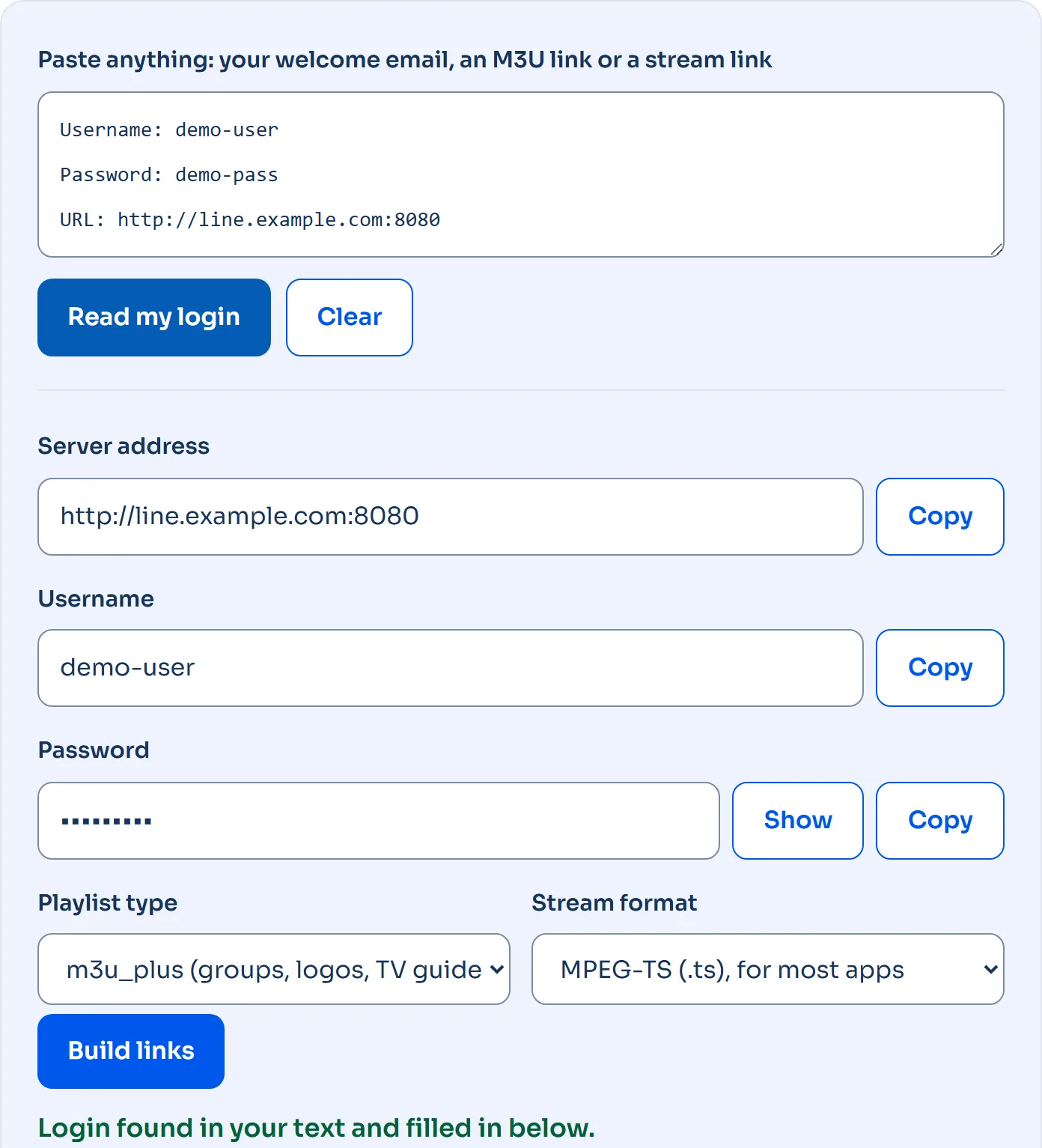
- First, copy the login your provider sent you. The whole email is fine, because the converter finds the server, username and password in it.
- Then paste it in the box above and press Read my login. Or type the 3 fields yourself instead.
- Then press Copy next to the M3U playlist link and paste it into your app.
Pick m3u_plus unless your app complains. It’s the same playlist, but with channel groups, logos and TV guide IDs added, and almost every app reads it. The plain m3u type exists for old players that choke on the extra tags.
What an Xtream to M3U link is made of
An Xtream Codes login and an M3U link carry the same 3 pieces of information. The converter just rearranges them into the address that Xtream Codes panels answer on:
| Part | Example | What it does |
|---|---|---|
| Server and port | http://line.example.com:8080 |
Your provider’s panel. The port matters: :8080 and :80 are different doors. |
| Playlist path | /get.php |
Asks the panel for the whole channel list as one M3U file. |
| Login | ?username=…&password=… |
Your account. Capital letters count. |
| Type | &type=m3u_plus |
m3u_plus adds groups, logos and guide IDs; m3u is the bare list. |
| Output | &output=ts |
ts gives MPEG-TS streams; m3u8 gives HLS streams. |
The TV guide link uses /xmltv.php with the same login, and the account status link uses /player_api.php. So open that last one in a browser, and the panel answers with your expiry date and how many screens you can use at once. If you want the history of the format itself, Wikipedia’s M3U article covers where it came from.
TS or HLS: which stream format to pick
Use TS on Android TV, Fire TV, Windows and Smart TVs. Switch to HLS (m3u8) on iPhone, iPad and Apple TV, or if you play the stream in a browser, because Apple’s players and browsers are built around HLS. That’s also what people mean by an Xtream to M3U8 converter: same login, output set to m3u8.
M3U to Xtream: get your login back from a link
For example, Smarters Pro and TiviMate work better with the Xtream login than with a link, because they then load films, series and the TV guide in their own menus. If all you have is an M3U link, paste it in the box at the top. The converter reads the server, username and password out of it and puts them in the fields, each with its own Copy button.
It also works with a single channel link like http://line.example.com:8080/live/username/password/1234.ts, which is handy when that’s the only thing left in an old email.
Where to paste the converted link
- VLC (Windows, Mac): Media, then Open Network Stream, paste the M3U link.
- Kodi: the PVR IPTV Simple Client add-on takes the M3U link and the TV guide link.
- Smart IPTV (Samsung, LG): upload the M3U link on the app’s website with your TV’s MAC address.
- TiviMate and Smarters Pro: choose Xtream Codes and use the 3 fields, or choose M3U and paste the link.
- Apple devices: use the HLS (m3u8) version of the link.
Not sure which app to use? Our IPTV player guide picks one per device, with store links.
Your login stays on this page
Converting Xtream Codes to M3U is plain text work, so the Xtream to M3U conversion runs in your browser and nothing is sent anywhere. You can test that: load this page, switch off your Wi-Fi, and the converter still builds your links. The only time anything leaves your device is when you press Download, and then your browser talks directly to your provider’s server.
But one honest warning: an M3U link contains your password in plain text. Don’t post it in forums or group chats, because anyone with the link can use your subscription.
When the converted link doesn’t work
- The app says “authentication failed” or the page shows {“user_info”:{“auth”:0}}: the username or password is wrong, or your subscription has expired. Check capital letters and spaces at the end.
- Nothing loads at all: the port is missing or wrong. Try the exact address from your welcome email, including the :8080 or :80 part.
- The Xtream login works in an app but the M3U link stays empty: your provider has most likely switched off M3U downloads for your line. Use the Xtream login instead, or ask them to enable it.
- Channels load but the guide is empty: paste the TV guide (EPG) link into your app’s EPG setting.
- It worked yesterday: open the account status link and check the expiry date and the number of active connections.
Xtream Codes vs M3U: which one should you use?
If your app supports Xtream Codes, use it. You get separate menus for live TV, films and series, and the guide loads by itself. Instead, use M3U for apps that only take a playlist, like VLC and Smart IPTV, or when you want to edit the channel list yourself.
Questions about converting Xtream to M3U
Is this Xtream to M3U converter free?
Yes, with no sign-up and no limit. It’s a small tool we built for our own customers and left open for everyone.
Does it work with any IPTV provider?
It works with any provider that uses an Xtream Codes compatible panel, which is what the get.php, xmltv.php and player_api.php addresses belong to. If your provider only ever gave you an M3U file and never a username and password, there’s nothing to convert.
Can I convert an M3U link to Xtream Codes?
Yes, as long as the link contains username= and password=. Paste it in the box at the top and press Read my login.
Why is my M3U link so long?
Because it carries your full login plus the type and output settings. That’s normal, and every app accepts it.
Need a line to convert?
Nordic Streaming gives every customer both an Xtream Codes login and an M3U link, so you never need a converter for our service. You can test it free for 24 hours, no credit card needed. Setting up on a phone or Firestick? Follow the Smarters Pro setup guide.