
Pick your IPTV player by screen, not by hype. On Android TV I’d install TiviMate, on a Samsung or LG TV Smart IPTV, on iPhone and Apple TV Smarters Pro or IPTVX, and on Windows or Mac VLC, which is free and opens any M3U link.
One thing first, because it’s easy to miss: an IPTV player is an empty app. It shows nothing until you add a playlist from your provider, either an M3U link or an Xtream Codes login. So this page also has 3 free tools. They turn an Xtream login into an M3U link, check a playlist file before you load it, and work out how much internet speed your screens need. Everything runs in your browser, and nothing you type is sent to us.
Which IPTV player for which device
Store links and prices were checked in October 2026. Also, where an app costs money, the price is the developer’s own.
| Device | Best IPTV player | Also works | Cost |
|---|---|---|---|
| Android TV, Google TV | TiviMate | Smarters Pro, Televizo, Sparkle TV, VLC, Kodi | Free to install, Premium is an in-app purchase |
| Amazon Fire TV | Smart IPTV (Android and Fire TV version) | Kodi | 5.49 EUR once per device after the free trial |
| Samsung TV (Tizen 6.5+, 2022 models and newer) | Smart IPTV | none we’d recommend | 5.49 EUR once per TV after the free trial |
| LG TV (webOS 3.0 and newer) | Smart IPTV | Kodi (webOS build) | 5.49 EUR once per TV after the free trial |
| iPhone, iPad | Smarters Pro | IPTVX, VLC | Free to install |
| Apple TV | IPTVX | VLC (tvOS 11 or later), Smarters Pro | Free to install |
| Windows PC | VLC | Smarters Pro for Windows, Kodi | VLC and Kodi are free |
| Mac | VLC | Kodi | Free |
| Android phone | Smarters Pro | VLC | Free to install |
A warning about the App Store. Search “IPTV Smarters” there and you get at least 3 apps with almost the same name, from 3 different developers. The official Smarters Pro is the one published by Tech Smarters Private Limited. The look-alikes aren’t always bad, but you can’t get support from the real developer for them.
Fire TV has no Google Play, so apps that are only in Google Play need sideloading there. If you’d rather not do that, Smart IPTV has its own Fire TV version.
How an IPTV player gets its channels
Your provider gives you one of two things. First, an M3U link is a single web address that lists every channel. Then there’s the Xtream Codes login, which is 3 fields: a server address, a username and a password.
Most apps take both, but not all. For example, VLC only takes an M3U link. Smarters Pro and TiviMate are happier with the Xtream login, because then they also load the TV guide and the films and series in separate menus. If you only have one of the two, the converter below gives you the other.
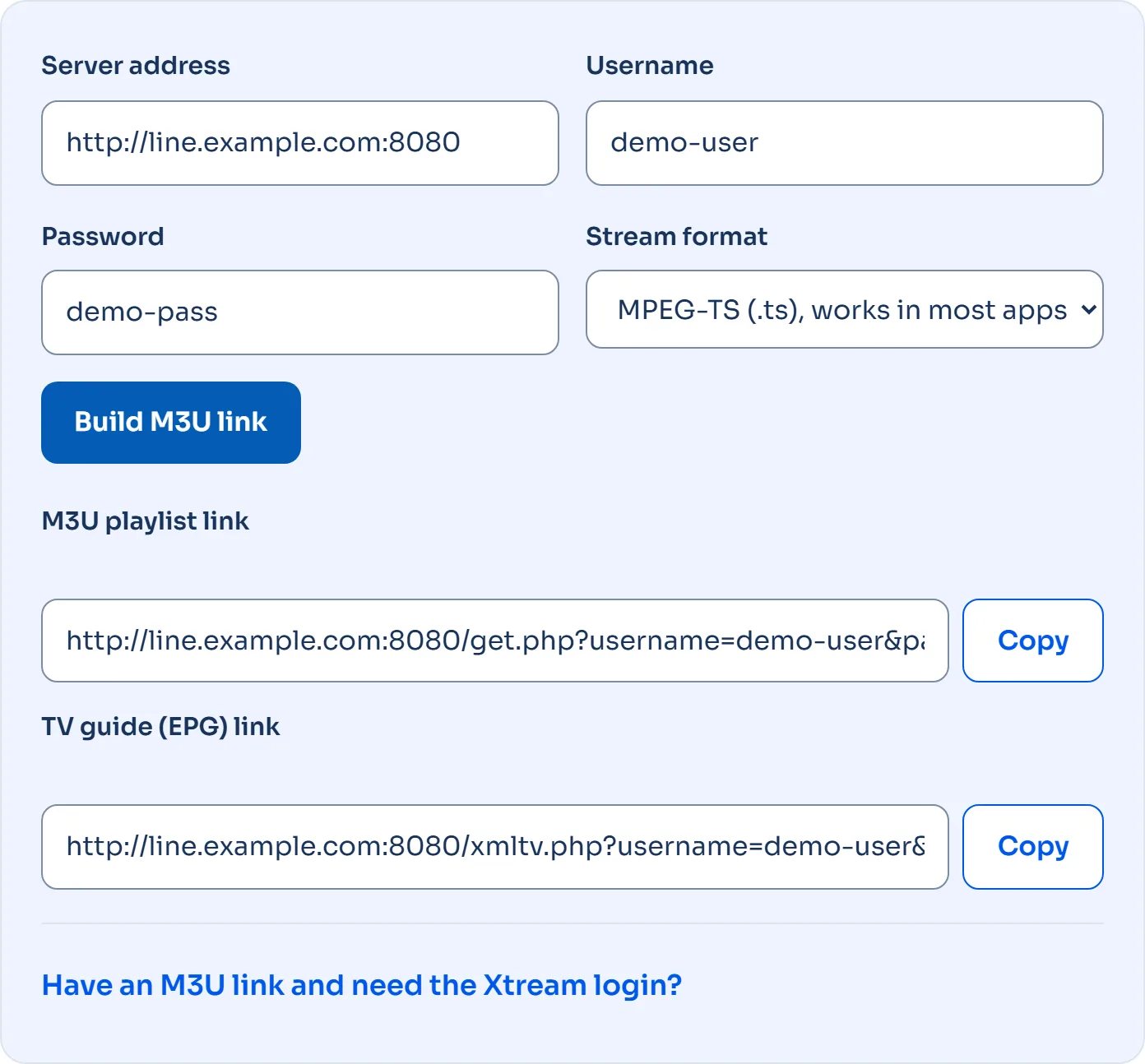
Xtream Codes to M3U converter
So fill in what your provider sent you. The IPTV player link is built right here in your browser, so your password never leaves this page. Need the reverse direction, a stream link read out, or your account status? Use the full Xtream to M3U converter.
Have an M3U link and need the Xtream login?
The link follows the standard Xtream Codes format: /get.php?username=…&password=…&type=m3u_plus. If the IPTV player still says “no channels”, check that the server address includes the port number (often 8080 or 80) and that you typed the password with the right capital letters.
M3U playlist checker
Next, paste a playlist or open the .m3u file you downloaded. The checker counts channels and groups, finds duplicates and tells you whether a TV guide is linked. Nothing is uploaded, and it never shows stream addresses, because those often contain your login.
One limit, said plainly: a browser can’t test whether each stream is online, because it blocks requests to another server unless that server allows it. The checker reads the structure of the list; to see if a channel plays, open it in your IPTV player.
How much internet speed does an IPTV player need?
Netflix publishes 3 Mbps for 720p, 5 Mbps for 1080p and 15 Mbps for 4K in its speed recommendations. For live 4K channels we recommend 25 Mbps per screen, because a live stream can’t buffer minutes ahead the way a film can. Add up your screens here.
Also, measure where the TV stands, not next to the router. A TV on Wi-Fi 2 rooms away can get much less than the speed test on your phone shows next to the router. If the number is close, a network cable fixes more buffering than any setting in the IPTV player.
Best IPTV player for Windows and Mac
VLC, but not because it’s pretty. It’s free, it’s made by the non-profit VideoLAN, and it plays almost every stream format. On Windows open Media, then Open Network Stream (Ctrl+N), paste the M3U link and press Play. On a Mac it’s File, then Open Network. Press Ctrl+L (Cmd+L on Mac) to see the channel list.
The downside: VLC has no TV guide grid and no channel logos. If you want a real guide on a computer, install Kodi with the PVR IPTV Simple Client add-on and give it the M3U link and the EPG link from the converter above. Smarters Pro also has a Windows app on its own website if you’d rather have the same menus as on your phone.
When the IPTV player shows no channels
- “Invalid login” or an empty list: the username and password are case-sensitive, and a space copied at the end of either breaks the login.
- Server not found: the port is missing.
http://line.example.comandhttp://line.example.com:8080are different addresses. - It worked yesterday: check that your subscription hasn’t expired and that you aren’t on more screens at once than your plan allows. Close the app on the other device and try again.
- Channels but no TV guide: the app needs the EPG link. Copy it from the converter above into the app’s EPG setting.
- Buffering every few minutes: measure the speed at the TV. If it’s below what the calculator above shows, switch to a cable or a 5 GHz Wi-Fi network.
- Apple TV or iPhone won’t play: switch the stream format to HLS (.m3u8) in the converter.
No playlist yet?
An IPTV player needs a service behind it. Nordic Streaming gives you both an M3U link and an Xtream Codes login, so it plays in every app on this page. You can test it free for 24 hours, no credit card needed, and then pick one of the IPTV subscription plans from 1 to 12 months. Setting up on a phone or Firestick first? Follow our step-by-step Smarters Pro guide.